• Home
  • Blog
  • Archive
  • Contact
  • About
Menu

Cassandra Morgan

Street Address
City, State, Zip
Phone Number

Your Custom Text Here

Cassandra Morgan

  • Home
  • Blog
  • Archive
  • Contact
  • About

February Favorites

January 30, 2019 Cassandra Morgan
FebruaryFavorites.jpg

Since February is the month of love, I’ve decided to take on another monthly challenge. This time I will be sharing things that bring me joy. No, this wasn’t inspired by the Marie Kondo craze. I just like sharing things that make me happy. Every day for the entire month of February, I will share something I enjoy. It may be something new; it may be something old. The only rule is that it makes me smile.

I’d love to see the things that make you smile too! You can comment with your February Favorites or post them over on Twitter and Instagram with the hashtag #FebFave2019

In February Favorites Tags February Favorites, favorite
Comment

Opening The ColourPop Mystery Bag

January 28, 2019 Cassandra Morgan
ColourpopMysteryBag.jpg

On January 21, cosmetic company ColourPop advertised a mystery bag called Let’s Get Wild. For a mere $25, you would receive $55 worth of product. I am a sucker for mystery bags so I leapt at the chance. I’m going to share what I got in the bag but I’m not going to swatch the products or review them. I already know I like a lot of ColourPop’s products. I do, however, want to see if I did get $55 worth of product for only $25. So let’s rip open the bag:

ColourpopShadow.jpg

First up, the eyeshadows. I received three - two super shock shadows and one pressed powder shadow. The shades are Sequin on the top right, Party of Five on the top left, and Come And Get It on the bottom. All of ColourPop’s eyeshadows are $5.00. Total: $15.00

ColourpopCheek.jpg

I only received one cheek product. This is the super shock highlighter in Counting Sheep. ColourPop’s highlighters are $8.00 each. Total: $23.00


ColourpopLiquidLip.jpg

Next up are the lip products. There were four in total. These two are the liquid lipsticks. On the right is the ultra glossy lip in Flying Horses. On the left is the ultra blotted lip in Doozy. The liquid lipsticks do vary a little in price. Both of these were $6.00 each, though some liquid lipsticks are $6.50. Total: $35.00

ColourpopLipstick.jpg

In addition to the liquid lipsticks, there was one lux lipstick. This shade is Sphynx. The lux lipsticks are $7.00 each. Total: $42.00


ColourpopLippie.jpg

The last lip product I received was one of ColourPop’s lippie stix in Ziggie. Lippie Stix costs $5.50 each. Total: $47.50

ColourpopMascara.jpg

Finally, the last product in the bag is one of ColourPop’s new mascaras. This color is Black On Black. These are $8.00 each. Total: $55.50

Yes! ColourPop did sent $55.00 worth of products! Granted, most of these are shades that I wouldn’t have picked for myself. I tend to go with more colorful shades but if I don’t use these, my daughter will. I also appreciate that ColourPop included one of their new mascaras. (I’m pretty sure this bag was intended to market the mascara, which I think is pretty cool.) I would have preferred one of the colored mascaras but it’s not like black mascara is useless. It’s just basic.

As a whole, I am happy with the products I received. If ColourPop ever does this again, I would recommend grabbing one. You can’t go wrong with their makeup and it is a really great deal. Thank you, ColourPop!

In Beauty Tags ColourPop, mystery bag, makeup
Comment

How To: Ruin An Internet Community

January 23, 2019 Cassandra Morgan

Back on January 8, the world of dog Twitter was rocked. (OK, maybe it wasn’t that dramatic.) The Twitter account Thoughts of Dog blocked another dog account, Theo-sophy. Why? Because Theo frequently commented on the Thoughts’ posts in the voice of Theo the dog. I don’t really understand the reasoning behind The Block but I’m going to try to figure it out and explain why I think Matt (the guy behind both Thoughts of Dog and We Rate Dogs) made a terrible mistake when he did it.

First, I’d like to link to a blog post from Theo’s owner, Nancy, with her perspective on the whole kerfuffle. It’s over here: https://notquiteold.com/2019/01/18/overdone/ Now onto my thoughts:

My husband and I have been big supporters of Matt and all of his dog-related business ventures. We have shirts and calendars and my husband literally has the back of his car COVERED in stickers, Yes, we followed all of Matt’s accounts across social media and shared them frequently. One of the things I got a kick out of was the responses on Thoughts of Dog’s posts from “your fren Theo.” They were adorable. I’m sorry but anyone who thinks that a couple of dogs having a conversation about their inner thoughts isn’t cute doesn’t have a heart. So I was stunned when I saw Matt complain on his personal Twitter about people commenting on his dog posts as dogs. The stun was doubled when I saw Theo say that Matt blocked him (her? Theo is a boy dog so I’m going with him….I’m saying that’s Theo’s Twitter account!) on the Thoughts of Dog account with no notice. WTF, indeed.

Before people start coming at me: Yes, Matt can do whatever he wants with his accounts. I’m not saying he can’t. I’m saying this was a terrible decision, especially considering this is his main source of income.

Twitter, as a social media platform, is built for conversations. It’s not a place where you drop some knowledge and hope nothing happens. It’s a place to build a community of people. When you have an account where you are role playing as someone else (yes, Thoughts of Dog is basically an RP account), the last thing you should do is cut out other people role playing in a similar world. That is the opposite of community. The people in your community are the people that are going to support you the most. These are the people buying your merch and going to meetups.

I’m not going to pretend I know what is going on in Matt’s head. I know that his personal Twitter post said he was annoyed with people responding to Tweets in dog voices. I know that he not only blocked Theo, he also blocked people who spoke out in support of Theo - complete with an “I’m glad these people are gone” response. In my mind, what Matt was basically saying to everyone is “This is my playground. I want you to give me your money but I don’t want you to play with my account.”

How should this have been handled? Matt should have just played along and let everyone interact with each other. There is enough internet for everyone. As example of how this works well is all of the various Twitter accounts based on the The Dresden Files novels by Jim Butcher. Not only does Harry Dresden, himself, have a Twitter account but a ton of the other characters have accounts as well. And those are actual characters in actual books with actual copyrights. Another example is the Green brothers (otherwise known as Hank and John Green - authors and YouTubers extraordinaire). They decided early in their careers that they wanted their fans to be able to make art based on their famous saying “Don’t Forget To Be Awesome” that they actively decided not to trademark the phrase. They chose their community over the mighty dollar.

Another option would have been to just have a private conversation with Nancy about how the Twitter responses made him uncomfortable (for some reason) and he would like them to stop. Of course, this would mean that he would either have to make a public statement asking people to not use dog accounts/voices to interact with his accounts, which might not go over well considering almost all of his posts on We Rate Dogs are pictures of other people’s dogs (Those same pictures that he puts in calendars and sells to people for money.), or he would have to message every single user he has a problem with asking them to stop, which could take up a lot of time.

But he didn’t do either of those. He went straight for the Block User option. Multiple times.

While I’m sure this has all blown over by now and everyone has forgotten about the doggie drama, it has put a bad taste in some people’s mouths, including my own. Personally, I have unfollowed Matt’s personal Twitter as well as Thoughts of Dog because now all I can see is Matt’s selfishness. Even We Rate Dogs has been tainted a bit for me but I haven’t given into unfollowing that account because I like looking at the pictures of the good boys and girls. And I can definitely say that I don’t plan on spending any more money on his merchandise. I’d rather give my money to someone who appreciates the people who support them.

What are your thoughts on the situation?

In Computers/Internet Tags Twitter drama, We Rate Dogs, Thoughts of Dog, Theo-sophy
Comment

The Downfall of Winter

January 21, 2019 Cassandra Morgan

Yeah, I already screwed up my goals for 2019 by not posting at all last week. I had plans to post some things but then my daughter brought home the Worst Head Cold In The Universe and was nice enough to share it with me. I mean, sharing is caring, right? So instead of spending my week writing and laughing and trying to enjoy winter (by the way, I hate winter with the passion of a million burning suns), I spent it trying to find the best combination of cold medicine that would allow me get through the day at my full time job then going to bed as early as possible to try to sleep the damned thing away.

Needless to say, I mostly accomplished those goals. I left work early one day to work from home so my co-workers didn’t have to hear my disgusting noises. But I did get all of my work done in a timely manner. That’s a check in the win column, right?

Now I am feeling much better. (Thank you for asking.) But we still have like two more months of this wretched winter. I’m hoping it won’t be too awful. Maybe if we all wish for spring (or, in my case, summer) as hard as we can, winter will just vanish off the face of the Earth, never to bother us again. Or maybe I’ll just move to Arizona. Please tell me Arizona doesn’t have snow….

Talking about snow, I was stuck in the house all weekend thanks to a forecasted snow/ice storm that was supposed to roll through my area. (Spoilers: It was a little snow but mostly rain which will now all freeze over into ice.) I took the housebound time to update the look of the blog a bit. It’s not a drastic change, mostly some different colors and fonts but I felt like it needed a new coat of paint. After all, it’s been like five years since the last update. I hope you like it as much as I do.

In Personal Tags cold, winter sucks
Comment

Why I Suck At Using Planners

January 9, 2019 Cassandra Morgan
Planners.jpg

I desperately want to be one of those people that use planners. I want to have a pretty layout and use pretty stickers and be all sorts of organized. Every year, I buy a brand new planner with the best of intentions. But, every year, I fail miserably. I use the planner for a few months then it ends up getting tossed in a drawer for the rest of the year. I’m going to try to look into the ‘why’ of my planner failure. Maybe you can help me overcome it so I will be plantastic this year.

First, I’m going to say that I don’t think the problem is the type of planner I buy. I have bought a few different types of planners and they all end up barely used. A couple of years ago, I purchased a classic Happy Planner (not that specific one, though) because I liked the layout and I prefer my planners to be dated. But it was way too big for me. So last year, I purchased a mini Happy Planner so I could fit it in my purse. If I had it with me all the time, I’d me more apt to use it, right? Nope. That also ended up in the drawer. This year I bought an Erin Condren planner that I customized. Maybe if it’s more ‘me,’ I’m more likely to use it.

So why do I think I give up on planners? I think the big reason is the limitation of a physical planner. My personal life, where I maintain the schedules of three people, is entirely kept on my phone’s calendar. I use the DigiCal app to color code all of our events. I can, with the flick of a wrist, tell you what we have planned for any particular day, complete with who planned it or what type of plan it is. (For example, all of my daughter’s dance classes & events are pink but her school concerts are yellow.) Unlike my phone calendar that I can use anytime and anywhere, I have to make time to use a physical planner. I have to find somewhere I can sit with my colored pens (I like to color code things) that isn’t too distracting. Considering I spend approximately three hours per night, three nights per week at the dance studio, it doesn’t leave me tons of undistracted time.

Another possible problem is that, every time I sit down with my planner, I feel like I need to plan at least a week, if not an entire month, ahead. And I just don’t have that many ideas. It was worse when I still filmed videos for YouTube. I’d need ideas for three videos per week plus blog posts. (I think I was trying to post twice a week back then?) I’m creative but I’m not THAT creative. I tend to do a little better when I’m spontaneous. Granted, sometimes that ends up with me sitting at my keyboard with writer’s block. I’ve just never been good at planning things out.

So how do I fix this? How do I become a planning goddess? Give me your tried and true tips and tricks to planning. It doesn’t have to be writing-related. Just how you plan…well…anything!

In Personal Tags planner, why I suck at planning, planning
Comment

How To: Make Temporary Tattoos

January 7, 2019 Cassandra Morgan
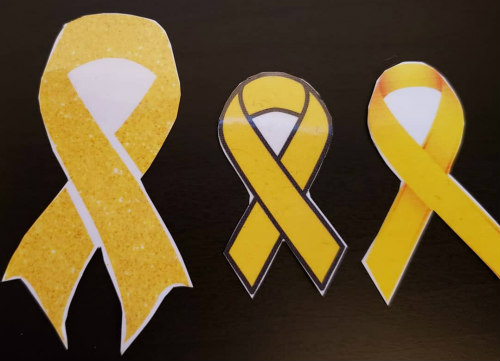
Ribbons.jpg

Back in September 2018, I made some temporary tattoos for an event my daughter’s dance studio was attending. I posted some pictures of them on my Instagram and some people asked me how I made them. It’s not nearly as difficult as one would think. So here is a quick walk-through on how to make your own temporary tattoos.

Supplies needed:
Temporary Tattoo Paper
Inkjet printer
Scissors or paper cutting machine (like a Cricut or Silhouette)

TempTattooPaper.jpg

The temporary tattoo paper I use is from Silhouette. Not only does Silhouette have cutting machines, they also have a stamp making machine, a 3D printer, and a ton of crafting supplies (like colored vinyl, heat transfers for fabrics, and glass etching, to name a few). I will admit that the temporary tattoo paper is a little on the expensive side. It is $10 for 2 sheets. However, you can get a lot of use out each sheet, depending on how large your designs are. If you don’t want to buy the paper online, it is also available in-store at many Joann Fabric locations.

Create your design in your preferred software. For the yellow ribbons, I downloaded a few designs from various graphics websites and lined them all up in a Word document. If you are creating your own design, you could do it in Photoshop. Silhouette also has a design studio where you can purchase designs from artists for your use. (I think Cricut is similar but I only own a Silhouette machine so that is what I am most familiar with.) If you are using a design with text or numbers, make sure you flip the design before you print it. Otherwise, your text will come out backwards when you apply the tattoo to skin.

Once you have your design ready, you want to print it onto the tattoo paper. (Again, don’t forget to flip any designs with text or numbers or if you want your design to face a specific way!) When you load the tattoo paper into your printer, make sure that the sticky side is the side getting printed on. My printer prints on the ‘bottom’ side of the paper in the feeder so I would put the tattoo paper in with the sticky side down. After your design has printed, set the paper aside for a bit to let the ink dry.

Now comes the difficult part. The clear adhesive sheet needs to be applied to the sticky side of the tattoo paper. Most likely, you won’t get the right on the first try. And that is OK. It took me a few tries before I found a technique that works for me.

At the top of the adhesive sheet is a small peel-off strip. Just peel that part off. This will attach to the top of the sticky side of your tattoo paper. Try to get the two pages to line up as straight as possible. Once that little adhesive strip is attached to your tattoo paper, carefully peel off the rest of the paper on the adhesive sheet. Slowly press the adhesive sheet onto the tattoo paper. As you press the adhesive sheet down, try to keep even pressure on the whole page. The goal is to have no air bubbles on any of the designs. (It doesn’t matter if there are air bubbles on the parts of the paper without the design. We’re going to cut that off anyway.)

When the entire adhesive sheet is attached to the tattoo paper, you can move onto cutting out your designs. If you have a cutting machine, you can follow the directions on your specific machine so it knows where to cut. Personally, I just cut my designs out with scissors. Whichever method you use, try to cut as closely to the edges of the design as possible. The least amount of “white space” on the finished tattoo, the better.

And that’s it! All you need to do now is apply the temporary tattoo. While I have only ever applied temporary tattoos to skin, I have read that some people apply them to woodworking pieces then cover it with a clear coat. Both applications would work the same - peel off the clear adhesive sheet from the design. Place the design on your skin/wood sticky side down. Take a damp cloth and wet the back of the paper. Slowly peel the paper from the design. There is your temporary tattoo.

RibbonTattoo.jpg


As a warning, any clear spaces on the design that aren’t cut out can be a little sticky for a bit. Make sure your tattoo is completely dry before doing anything where it would pick up dirt. The tattoo will wash over after a couple of days or you can remove it faster with some rubbing alcohol. It’s a great way to show some team spirit without a ton of work.

Good luck!

In How To Tags how to, temporary tattoo, how to make a temporary tattoo, Silhouette, temporary tattoo paper, how to make my own temporary tattoo
Comment

My Favorite Television - 2018

January 2, 2019 Cassandra Morgan
FavoriteTV.png

Even though it’s officially 2019, I’m going to continue talking about 2018 this week. I’m going to talk about my favorite television shows from 2018 today and Friday will be my favorite movies. Much like my list of favorite songs, these shows may not be from 2018 but they are the shows I watched a lot last year.

GoodPlace.jpg

When I first saw a commercial for The Good Place back in 2016, I wrote it off as a fluff show. The premise didn’t sound interesting at all. Then I ran out of shows to binge on Netflix. So in a moment of “why not,” I turned it on. It is SO GOOD.

The original commercials made me think this was about Kristen Bell in heaven. It’s not. Well, it is but it isn’t. Kristen Bell’s character, Eleanor, is a trash person. She insults everyone, she literally defrauds old people for a living, and she is only out for herself. When she dies, she is sent to heaven. But she knows she doesn’t belong there. So she tries to get her soulmate, Chidi (William Jackson Harper), to help her earn her way into heaven. Since he was an ethics professor when he was alive, it makes sense that he might be able to teach her how to be a good person.

I would really love to tell you more about the show but I would hate to spoil it for anyone that hasn’t seen it. There are currently three seasons of The Good Place. They are all available either on Netflix or Hulu. You should definitely check it out. You won’t regret it.

WorldofDance.jpg

If you couldn’t tell from my Instagram, a lot of my life revolves around dance. Both my daughter and I dance. We spend a lot of time in the dance studio or at dance events. Normally, we don’t watch a lot of dance reality shows. I’ve only seen one season of Dancing With The Stars and I’ve never seen So You Think You Can Dance. But World of Dance had a few dancers that we recognized from social media. Since it’s on this list, you can figure out that we enjoyed it.

We aren’t big fans of the judges. Sometimes they make decisions that make no sense to us. But that’s OK. We’re really there to watch the dancers. Thanks to this show, we have been introduced to a lot of amazing dancers and dance groups that we never would have seen otherwise. If you love dance and you can tune out all of the actual reality show stuff, WoD is a pretty good show.

DancingStarsJr.jpg

Even though we’ve never really watched Dancing With The Stars (beyond watching a few favorite celebrity routines on YouTube), my daughter was looking forward to the junior version of the show. Once again, the lineup featured a couple of dancers we followed on social media. (I think that might be the key.) Juniors was a little more light-hearted than other dance reality shows, which added to the fun a bit. I’m not sure if we would watch a second season, though. It depends on who the competitors are.

Sabrina.jpg

The Chilling Adventures of Sabrina. I’m not sure I actually have words for this Netflix series. It has almost everything I want out of a supernatural television show. I only say ‘almost’ because I think I would prefer a little more theatrics in my television witchcraft but the show isn’t any lesser without it. The show has a perfect balance between Sabrina’s witch life and her mortal life. And Kiernan Shipka is amazing as the title character.

Sabrina recently released a holiday special that is a perfect witchy companion to all of the Christmas specials out there. If you are into supernatural witchiness, this is definitely the show for you. (Much better than CW’s Supernatural and it can easily be binge-watched in a day or two.)

While this isn’t a comprehensive list of everything I watched in 2018, these were my favorites. A few shows that didn’t quite make the list are Netflix’s Nailed It!, Crazy Ex-Girlfriend, The Good Doctor, and Netflix’s BoJack Horseman. However, these weren’t shows that made me run to my TV every week to watch. I enjoyed them when I remembered to watch them but I didn’t carve out time in my week to fit them in. Let’s just say I’m thankful that DVRs exist.

Were there any shows that you absolutely loved this year? Or are there any older shows you think I should check out? Let me know in the comments.


In Television Tags 2018, favorite television, television
Comment

Goals for 2019

January 1, 2019 Cassandra Morgan
2019 Goals.png

I’m not really big on making New Year’s Resolutions. Mostly because they feel like non-specific, unattainable things that hang over my head to make me feel bad about myself. Things like “Lose Weight.” It sounds great but what does that mean? Am I successful if I lose 2 lbs? 10 lbs? Instead, I prefer to make a list of specific goals. I’m sharing my 2019 list with you.

Write at least one blog post every week.
As I said back in November, I have failed miserably at keeping up with my blog. I don’t want that to happen again. So while I’m planning to write three blog posts per week, I know that may not be sustainable for me. I can definitely do one post per week, though.

Get more massages.
This one sounds weird. I have some fairly chronic back pain. It’s nothing debilitating but, if I don’t keep up with regular massages, I can get some very painful muscle spasms. Usually one massage every six months is good enough. I would like to get a massage more frequently though. Maybe instead of keeping the pain at bay, it will actually help me get somewhat better.

Finally cover up that old tattoo.
I got my first tattoo in 1995. It’s a shooting star on my left arm. Needless to say, I was a broke college kid so it wasn’t the best tattoo work. I also didn’t do a great job of taking care of it. Now it’s kinda fuzzy and generally terrible to look at. I’ve wanted to get it covered for years but I couldn’t figure out what design I wanted. This thing is almost 25 years old. It’s time for it to go.

Consume less true crime media.
Well, this may be the most difficult of the year’s goals. I listen to a LOT of true crime podcasts. I watch a lot of true crime documentaries. I watch a lot of true crime YouTubers. And I think it might be making my anxiety worse. I’m not saying I’m going to give it up completely. And maybe it’s not making my anxiety worse. But I can try to watch and listen to fewer stories about the terrible people in the world. If less true crime doesn’t make me less anxious, I can always add it back in. So, anyone have some non-murdery podcasts they’d like to recommend?

These are my main goals for 2019. If you are interested in my progress, I’ll gladly do a quarterly update. A monthly update would probably be too boring.

Now it’s your turn. What are your goals for 2019?

In Personal Tags 2019, new year's goals
1 Comment

My Favorite Songs - 2018

December 31, 2018 Cassandra Morgan
FavoriteSongs.png

With the new year beginning soon, I thought I would share with you some of my favorite things from 2018. I’m going to start with five of my favorite songs. Now, not all of these songs were actually released in 2018. However, 2018 is when I fell in love with them or when I really began to enjoy them. Yes, sometimes I am late to the game and that is perfectly fine.

Boombayah by BLACKPINK

K-Pop phenomenon, BLACKPINK, released this song in 2016 but I think most Americans found out about them this year. I don’t think there are any BLACKPINK songs that I don’t like. This one is just my go-to track.

Favorite lyric: Middle finger up, F U pay me


Dancing’s Not A Crime by Panic! At The Disco

Panic! At The Disco released a new album this year, Pray For The Wicked. Yeah, I’m a pretty big fan. Most people are familiar with the hits that came off it: Say Amen (Saturday Night), High Hopes, and Hey Look Ma, I Made It. However, this track speaks to my soul. My daughter is frequently telling me to stop dancing because it’s embarrassing. Too bad, I love dancing

Favorite lyric: Dancing, dancing, dancing's not a crime/Unless you do it without me


The Other Side - The Greatest Showman soundtrack

The Greatest Showman was released in December 2017 so it’s not super old. Again, most people prefer other songs on the album but the duet between Hugh Jackman and Zac Efron takes the cake for me. The choreography is absolutely amazing. (Little known fact: Daniel ‘Cloud’ Campos plays the bartender in that scene. Not only did he help choreograph The Other Side, he also directed the Panic! At The Disco music video trilogy: Say Amen (Saturday Night), This Is Gospel, and Emperor’s New Clothes.)

Favorite lyric: But you would finally live a little, finally laugh a little/Just let me give you the freedom to dream /And it'll wake you up and cure your aching/Take your walls and start 'em breaking/Now that's a deal that seems worth taking/But I guess I'll leave that up to you


Crush by Tessa Violet

Tessa released two new singles this year - Crush and Bad Ideas. Bad Ideas is a good song but I have been obsessed with Crush ever since the video came out back in June. It is just so dang good.

Favorite lyric: I got a fascination with your presentation making me/feel like you're on my island you're my permanent vacation


Curious by Hayley Kiyoko

As I said earlier, I’m a pretty big fan of Panic! At The Disco. Well, Hayley Kiyoko opened for them on the first leg of their US tour. She released Curious in January, shortly before the tour kicked off, and it makes me want to jump out of my chair to dance.

Favorite lyric: Did you take him to the pier in Santa Monica? Forget to bring your jacket wrap up in him cuz you wanted to?


So, there you go. Five of the songs that rocked my 2018. What were your hits of the year? Let me know down in the comments. I love me some new music!

In Music Tags music, 2018, favorite songs, Panic! At The Disco, BLACKPINK, Tessa Violet, Hayley Kiyoko, The Greatest Showman
Comment

Merry Christmas

December 25, 2018 Cassandra Morgan
Christmas.jpg

I failed at the Christmas movie advent calendar, which is OK. I forgot to record one of the movies and one of the upcoming movies on Lifetime’s list was another MarVista movie. I didn’t want to put myself through that again. So, I made it through 21 days - not a terrible run.

Now I can wish everyone a very Merry Christmas and we can all move onto things better than Hallmark and Lifetime movies!

Comment
← Newer Posts Older Posts →

Subscribe

Sign up for our weekly newsletter

We respect your privacy.

Thank you!
Archive
  • December 2025
  • November 2025
  • October 2025
  • March 2025
  • February 2025
  • January 2025
  • December 2024
  • November 2024
  • October 2024
  • September 2024
  • March 2024
  • February 2024
  • January 2024
  • December 2023
  • November 2023
  • October 2023
  • February 2023
  • January 2023
  • December 2022
  • November 2022
  • October 2022
  • September 2022
  • August 2022
  • February 2022
  • January 2022
  • December 2021
  • November 2021
  • October 2021
  • September 2021
  • January 2021
  • December 2020
  • November 2020
  • December 2019
  • November 2019
  • February 2019
  • January 2019
  • December 2018
  • November 2018
  • May 2017
  • April 2017
  • October 2016
  • April 2016
  • February 2016
  • January 2016
  • October 2015
  • September 2015
  • August 2015
  • July 2015
  • June 2015
  • May 2015
  • April 2015
  • March 2015
  • February 2015
  • January 2015
  • December 2014
  • November 2014
  • October 2014
  • September 2014
  • August 2014
  • June 2014
  • May 2014
  • April 2014
  • March 2014
  • February 2014
  • January 2014
  • November 2013
  • September 2013
  • August 2013
  • July 2013
  • June 2013
  • May 2013
  • April 2013
  • March 2013
  • February 2013
  • January 2013
  • December 2012
  • November 2012
  • October 2012
  • September 2012
  • August 2012
  • July 2012
  • June 2012
  • May 2012
  • April 2012
  • March 2012
  • February 2012
  • January 2012
  • December 2011
  • November 2011
  • October 2011
  • September 2011
  • August 2011
  • July 2011
  • June 2011
  • May 2011
  • April 2011
  • March 2011
  • February 2011
  • January 2011
  • December 2010
  • November 2010
  • October 2010
  • September 2010
  • August 2010
  • July 2010
  • June 2010
  • May 2010
  • April 2010
  • March 2010
  • February 2010
  • January 2010
  • December 2009
  • November 2009
  • October 2009
  • September 2009
  • August 2009
  • July 2009
  • June 2009
  • May 2009
  • April 2009
  • March 2009
  • February 2009
  • January 2009
  • December 2008
  • November 2008
  • October 2008
  • September 2008
  • August 2008
  • July 2008
  • June 2008
  • May 2008
  • April 2008
  • March 2008
  • February 2008
  • January 2008
  • December 2007
  • November 2007
  • October 2007
  • September 2007
  • August 2007
  • July 2007